Android storage cleaner focused on large files, duplicates, and screenshots
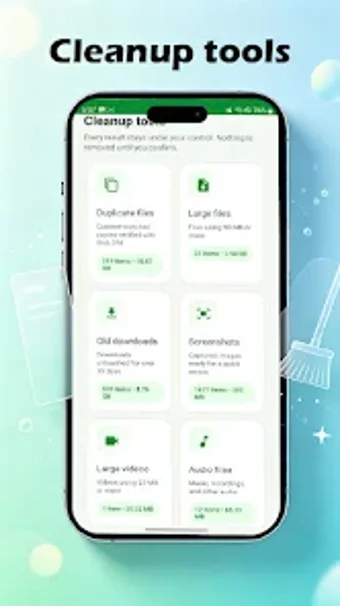
Experience JunkHarbor by GHS INVES, an Android utility for reclaiming internal storage space. The app scans device storage to identify large files, duplicate items, obsolete downloads, and screenshots so users can review candidates for deletion. It highlights media-heavy items and organizes results into clear categories for faster decisions. The target audience is Android owners running low on storage who need a straightforward tool to remove redundant files and free space quickly.
What does JunkHarbor actually do?
Moreover, JunkHarbor locates specific sources of wasted space by scanning for large files, duplicate files, downloads, screenshots, and large audio or video files. The app presents these categories separately, which helps users focus on one file class at a time. Its stated goal is to enable informed deletion decisions rather than automatic removal: identified items are shown for user review before any deletion occurs.
Does it slow down your device during a scan?
In addition, the tool is described as lightweight, which implies modest resource use during operation on modern Android devices. Scans focus on file metadata and content signatures, a method that generally keeps CPU and I/O activity bounded compared with full sector-level operations. This design suits on-device maintenance sessions that a user can run without expecting prolonged system interruption.
Is it safe to remove files with this app?
Nevertheless, JunkHarbor deliberately requires user approval before deleting anything, reducing the risk of accidental loss. The app's workflow surfaces duplicates and old downloads for manual confirmation, so it does not perform blind deletions. That behavior supports cautious use on devices where accidental removal of downloaded installers or screenshots would be problematic.
Do I need technical knowledge to operate it?
Moreover, the interface targets straightforward storage management rather than advanced file-system control. Categorized views and a clear presentation of large media files let average Android users make choices without in-depth technical knowledge. Power users who need low-level recovery or batch scripting may find the tool limited, since it focuses on identification and manual review rather than automated or forensic operations.
Practical choice for space-conscious Android users with one caveat
JunkHarbor is a practical option for Android owners who need targeted help identifying storage waste, since it separates large files, duplicates, downloads, screenshots, and media for manual review. The main caveat is that it emphasizes identification and user-controlled deletion rather than automated recovery or advanced batch operations, so users seeking aggressive automation should expect a more hands-on workflow.